
Create and manage API keys
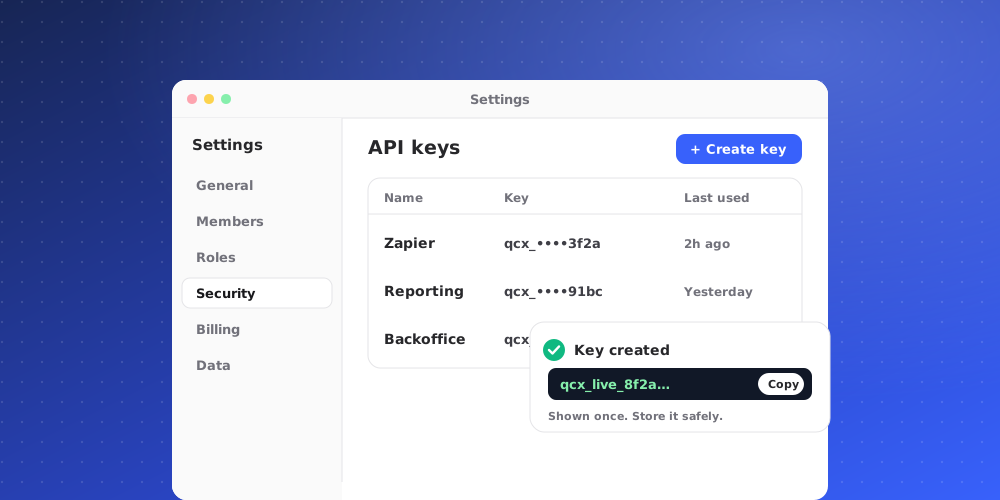
API keys let your own systems use the QuantCX REST API to read contacts, tickets and conversations, and to push contacts in. A key belongs to the workspace, not to a person.
Who can manage keys
Only owners and admins can create and revoke API keys. Your workspace's plan must include API access. If it does not, creating a key shows an error saying so.
Create a key
- Go to Settings > Channels & API > API Keys.
- Click Create API key.
- Give it a Name that says what uses it, for example "Product database sync".
- Under What it can do, choose one or both scopes:
- Read: list contacts, tickets and conversations.
- Write: push contacts in.
- Click Create key.
A key needs at least one scope. Give it only what it needs: a reporting script needs Read only.
Copy it now
The new key is shown once, under Your new API key. Copy it and store it somewhere safe, such as your server's environment variables or a secrets manager. QuantCX keeps only a hash of it, so it can never be shown again. If you lose it, revoke it and create another.
Keys start with qcx_live_. Your systems send it with every request as Authorization: Bearer qcx_live_….
See your keys
The API keys list shows each active key with its name, its last four characters so you can recognise it, its scopes, and Last used (or Never used). A key that has not been used for a long time is a good one to revoke.
Revoke a key
Open the key's menu and choose Revoke. The key stops working at once and leaves the list. This cannot be undone. Anything still using it will start getting errors, so create its replacement first.
Revoke a key straight away if it may have leaked, for example if it was pasted into a chat or committed to code.
Keep keys safe
- Never put a key in a website or app that runs in the browser. Anyone could read it there.
- Use one key per system, so you can revoke one without breaking the others.
- A key can also be used with the QuantCX MCP server, where it is read-only.
Developers can find the endpoints, parameters and examples under Documentation.